---
title: Add Packages
description: How to add packages
---
[Skip to content](https://support.ffair.io/migration/add-packages#main-content)
English
Show submenu for translations
[](https://www.ffair.io)
Open main navigation
Close main navigation
- English
Show submenu for translations
- [Contact Us](https://support.ffair.io/kb-tickets/new)
[Contact Us](https://support.ffair.io/kb-tickets/new?hsLang=en)
Hello. How can we help you?
- There are no suggestions because the search field is empty.
1. [FFAIR Help Desk](https://support.ffair.io/migration?hsLang=en)
2. [Organiser](https://support.ffair.io/migration/organiser?hsLang=en)
3. [Setting Up A Show](https://support.ffair.io/migration/organiser?hsLang=en#setting-up-a-show)
January 17, 2024
# Add Packages
## How to add packages
**Introduction:** Packages serve as a convenient way to showcase an exhibitor's purchase details and the associated offerings, such as a 500w Double Socket or Start-Up Package. Additionally, Packages aid in refining task allocations.
**1\. Navigate to the show Settings Page:**
- Log in to your portal.
- Select the relevant Show.
- In the left menu, find and click on "Settings."
**2. Scroll Down to Packages:**
- Within the Settings page, locate the section designated for Packages.
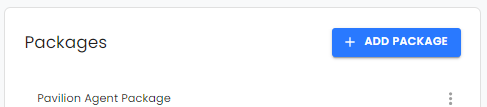
**3. Press '+ ADD PACKAGE' Button:**
- Click on the '+ ADD PACKAGE' button to initiate the creation of a new Package.
**4. Enter the Package Name:**
- In the provided form, input the desired name for the Package.
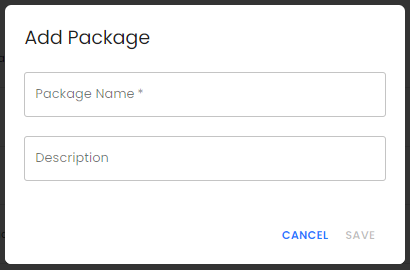
**Tip:** Maintain consistent formatting (e.g., Title Case) for effective Bulk Importing of exhibitors.
**5. Package Description:**
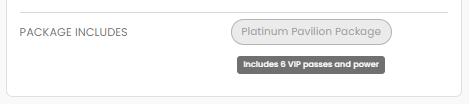
- Provide a description of the Package to offer exhibitors insights into its inclusions. This information will be displayed as a tooltip in the exhibitor portal when hovering over the Package name.
*Exhibitor View:*
**6. Press 'Save':**
- After entering all required details, press 'Save' to finalise the creation of the Package. To discard changes, press 'Cancel.'
**8. Edit a Package:**
- To make modifications, select the three-dot menu next to the respective Package and choose 'Edit.'
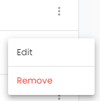
- The modal will appear; implement your changes and press 'Save' when finished.
**9. Remove a Package:**
- Press the three-dot menu next to the Package and select 'Remove.'
**Warning:** Deleting a Package will permanently remove all linked data.
- [Organiser](https://support.ffair.io/migration/organiser?hsLang=en#main-content)
- [Your FFAIR Account](https://support.ffair.io/migration/organiser?hsLang=en#your-ffair-account)
- [Getting Started](https://support.ffair.io/migration/organiser?hsLang=en#getting-started)
- [Setting Up A Show](https://support.ffair.io/migration/organiser?hsLang=en#setting-up-a-show)
- [Your Show Info](https://support.ffair.io/migration/organiser?hsLang=en#your-show-info)
- [Managing Exhibitor Tasks](https://support.ffair.io/migration/organiser?hsLang=en#managing-exhibitor-tasks)
- [Managing Exhibitors](https://support.ffair.io/migration/organiser?hsLang=en#managing-exhibitors)
- [Exhibitor Shop](https://support.ffair.io/migration/organiser?hsLang=en#exhibitor-shop)
- [Reporting & Data Collection](https://support.ffair.io/migration/organiser?hsLang=en#reporting-data-collection)
- [Integrations](https://support.ffair.io/migration/organiser?hsLang=en#integrations)
- [FAQ's](https://support.ffair.io/migration/organiser?hsLang=en#faqs)
- [Exhibitor](https://support.ffair.io/migration/exhibitor?hsLang=en#main-content)
- [Exhibitor Portal Overview](https://support.ffair.io/migration/exhibitor?hsLang=en#exhibitor-portal-overview)
- [Account Set Up](https://support.ffair.io/migration/exhibitor?hsLang=en#account-set-up)
- [Dashboard](https://support.ffair.io/migration/exhibitor?hsLang=en#dashboard)
- [Tasks](https://support.ffair.io/migration/exhibitor?hsLang=en#tasks)
- [Manual](https://support.ffair.io/migration/exhibitor?hsLang=en#manual)
- [Shop](https://support.ffair.io/migration/exhibitor?hsLang=en#shop)
- [FAQs](https://support.ffair.io/migration/exhibitor?hsLang=en#faqs)
- [Supplier](https://support.ffair.io/migration/supplier?hsLang=en#main-content)
- [Supplier Onboarding Guide](https://support.ffair.io/migration/supplier?hsLang=en#supplier-onboarding-guide)
- [Account Set Up](https://support.ffair.io/migration/supplier?hsLang=en#account-set-up)
- [Show Set Up](https://support.ffair.io/migration/supplier?hsLang=en#show-set-up)
- [Show/Shop Features](https://support.ffair.io/migration/supplier?hsLang=en#show-shop-features)
- [FAQ's](https://support.ffair.io/migration/supplier?hsLang=en#faqs)
- [Accounting](https://support.ffair.io/migration/supplier?hsLang=en#accounting)
[](https://www.ffair.io/)
[mailto:email@email.com](mailto:email@email.com)
Copyright © 2026, FFAIR Ltd