---
title: How to Use Zapier Integration for Order Synchronisation
description: The FFAIR platform now supports Zapier integration, allowing you to automatically sync order details with your preferred tools.
---
[Skip to content](https://support.ffair.io/migration/how-to-use-zapier-integration-for-order-synchronisation#main-content)
English
Show submenu for translations
[](https://www.ffair.io)
Open main navigation
Close main navigation
- English
Show submenu for translations
- [Contact Us](https://support.ffair.io/kb-tickets/new)
[Contact Us](https://support.ffair.io/kb-tickets/new?hsLang=en)
Hello. How can we help you?
- There are no suggestions because the search field is empty.
1. [FFAIR Help Desk](https://support.ffair.io/migration?hsLang=en)
2. [Supplier](https://support.ffair.io/migration/supplier?hsLang=en)
3. [Show/Shop Features](https://support.ffair.io/migration/supplier?hsLang=en#show-shop-features)
June 6, 2025
# How to Use Zapier Integration for Order Synchronisation
## The FFAIR platform now supports Zapier integration, allowing you to automatically sync order details with your preferred tools.
#### **What is the Zapier Integration?**
Zapier allows you to link FFAIR with a wide range of applications, enhancing your workflows by automatically synchronising order data. This means that actions such as processing payments, generating invoices, and handling cancellations are instantly updated in your connected applications.
#### **How to Set Up Zapier Integration**
### **Step 1: Access Zapier Integration Settings**
1. Log in to your FFAIR account and go to **Show Settings**.
2. Navigate to the **Integrations** section.
3. Click on the **Zapier** option.
### **Step 2: Add Your Zap URL**
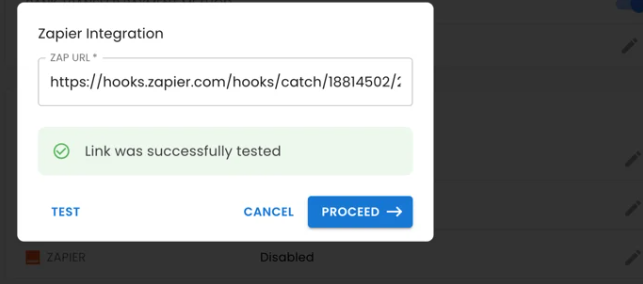
1. In the **Zapier pop-up**, locate the **Zap URL** field.
2. Paste your Zap URL (from your Zapier account) into the field.
3. If the URL passes validation, click **Test** to test the connection.
4. The platform will send a sample order to your Zap to verify the connection.
5. A success message will confirm the test if everything is set up correctly.
6. Click **Proceed** to set up the integration.
- **Tip:** If you’re new to Zapier or need help creating a Zap, refer to our [Zapier Integration article](https://support.ffair.io/zapier-integration?hsLang=en).
#### **What Happens After Connecting Zapier?**
1. **Sync Existing Orders:**
- All current orders are synced to Zapier immediately upon connection.
- A progress bar will display the syncing status.
2. **Real-Time Updates:**
- Future orders, including paid invoices and cancellations, are automatically synced to Zapier.
3. **Error Handling:**
- If an error occurs, it will be displayed in the Zapier pop-up for troubleshooting.
4. **Manage Connection Status:**
- Once the connection is established, the Zapier option will show as **Connected**.
- You can remove the Zap URL anytime to disconnect.
---
#### **Actions Triggered by Zapier**
1. **Order Created:** New orders will sync to Zapier.
2. **Order Paid:** Updates are triggered when an order is paid or an invoice is generated.
3. **Order Canceled:** Cancelled orders are reflected in your connected tools.
---
#### **How to Remove the Zapier Integration**
1. Navigate back to **Show Settings** → **Integrations** → **Zapier**.
2. Delete the Zap URL in the Zapier pop-up.
3. This action will disconnect Zapier from your FFAIR account.
---
#### **FAQs and Troubleshooting**
- **What if I don’t have existing orders?**
You can still enable Zapier integration. Any future orders will sync automatically once created.
- **What if the Test Zap fails?**
- Ensure your Zap URL is correct and active.
- Check your Zapier account for any configuration errors.
- Refer to our [Zapier Integration article](https://support.ffair.io/zapier-integration?hsLang=en) for troubleshooting tips.
- **What if the syncing process fails?**
Check the error message in the Zapier pop-up and troubleshoot accordingly.
- [Organiser](https://support.ffair.io/migration/organiser?hsLang=en#main-content)
- [Your FFAIR Account](https://support.ffair.io/migration/organiser?hsLang=en#your-ffair-account)
- [Getting Started](https://support.ffair.io/migration/organiser?hsLang=en#getting-started)
- [Setting Up A Show](https://support.ffair.io/migration/organiser?hsLang=en#setting-up-a-show)
- [Your Show Info](https://support.ffair.io/migration/organiser?hsLang=en#your-show-info)
- [Managing Exhibitor Tasks](https://support.ffair.io/migration/organiser?hsLang=en#managing-exhibitor-tasks)
- [Managing Exhibitors](https://support.ffair.io/migration/organiser?hsLang=en#managing-exhibitors)
- [Exhibitor Shop](https://support.ffair.io/migration/organiser?hsLang=en#exhibitor-shop)
- [Reporting & Data Collection](https://support.ffair.io/migration/organiser?hsLang=en#reporting-data-collection)
- [Integrations](https://support.ffair.io/migration/organiser?hsLang=en#integrations)
- [FAQ's](https://support.ffair.io/migration/organiser?hsLang=en#faqs)
- [Exhibitor](https://support.ffair.io/migration/exhibitor?hsLang=en#main-content)
- [Exhibitor Portal Overview](https://support.ffair.io/migration/exhibitor?hsLang=en#exhibitor-portal-overview)
- [Account Set Up](https://support.ffair.io/migration/exhibitor?hsLang=en#account-set-up)
- [Dashboard](https://support.ffair.io/migration/exhibitor?hsLang=en#dashboard)
- [Tasks](https://support.ffair.io/migration/exhibitor?hsLang=en#tasks)
- [Manual](https://support.ffair.io/migration/exhibitor?hsLang=en#manual)
- [Shop](https://support.ffair.io/migration/exhibitor?hsLang=en#shop)
- [FAQs](https://support.ffair.io/migration/exhibitor?hsLang=en#faqs)
- [Supplier](https://support.ffair.io/migration/supplier?hsLang=en#main-content)
- [Supplier Onboarding Guide](https://support.ffair.io/migration/supplier?hsLang=en#supplier-onboarding-guide)
- [Account Set Up](https://support.ffair.io/migration/supplier?hsLang=en#account-set-up)
- [Show Set Up](https://support.ffair.io/migration/supplier?hsLang=en#show-set-up)
- [Show/Shop Features](https://support.ffair.io/migration/supplier?hsLang=en#show-shop-features)
- [FAQ's](https://support.ffair.io/migration/supplier?hsLang=en#faqs)
- [Accounting](https://support.ffair.io/migration/supplier?hsLang=en#accounting)
[](https://www.ffair.io/)
[mailto:email@email.com](mailto:email@email.com)
Copyright © 2026, FFAIR Ltd