---
title: Orders
description: View and Track your product orders for a show.
---
[Skip to content](https://support.ffair.io/migration/orders-1#main-content)
English
Show submenu for translations
[](https://www.ffair.io)
Open main navigation
Close main navigation
- English
Show submenu for translations
- [Contact Us](https://support.ffair.io/kb-tickets/new)
[Contact Us](https://support.ffair.io/kb-tickets/new?hsLang=en)
Hello. How can we help you?
- There are no suggestions because the search field is empty.
1. [FFAIR Help Desk](https://support.ffair.io/migration?hsLang=en)
2. [Exhibitor](https://support.ffair.io/migration/exhibitor?hsLang=en)
3. [Shop](https://support.ffair.io/migration/exhibitor?hsLang=en#shop)
March 15, 2024
# Orders
## View and Track your product orders for a show.
**View and Track Your Product Order(s) for a Show**
- Navigate to the "Orders" page from the left-hand menu.
- Here, you'll find an overview of all orders you've placed with suppliers for this particular show.
- Details displayed include:
- Order number
- Product
- Extras
- Total
- Order Date
- Supplier
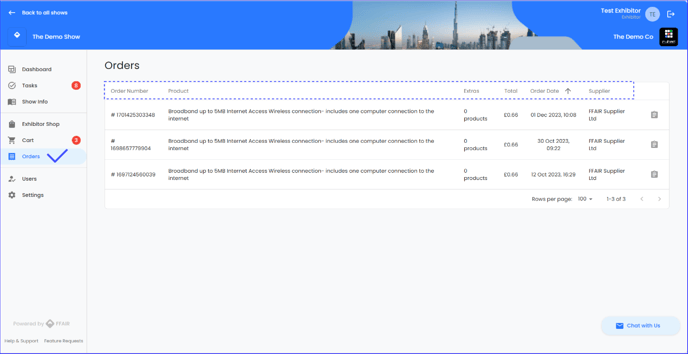
- To view more information about a specific order, click the clipboard icon located to the right of the order details. 
- A pop-up side modal will appear, providing you with access to:
- Order confirmation
- Delivery details
- Payment details
- Products ordered details
- In the products section of the modal, you can click the three dots located to the right of the product details.
- From here, select "Contact Supplier" to access the supplier's phone number and email address. This enables you to reach out to them directly if you have any queries or need assistance with your order.
- Additionally, you can click the document icon in the top right corner to download your Tax Invoice for the order.
- [Organiser](https://support.ffair.io/migration/organiser?hsLang=en#main-content)
- [Your FFAIR Account](https://support.ffair.io/migration/organiser?hsLang=en#your-ffair-account)
- [Getting Started](https://support.ffair.io/migration/organiser?hsLang=en#getting-started)
- [Setting Up A Show](https://support.ffair.io/migration/organiser?hsLang=en#setting-up-a-show)
- [Your Show Info](https://support.ffair.io/migration/organiser?hsLang=en#your-show-info)
- [Managing Exhibitor Tasks](https://support.ffair.io/migration/organiser?hsLang=en#managing-exhibitor-tasks)
- [Managing Exhibitors](https://support.ffair.io/migration/organiser?hsLang=en#managing-exhibitors)
- [Exhibitor Shop](https://support.ffair.io/migration/organiser?hsLang=en#exhibitor-shop)
- [Reporting & Data Collection](https://support.ffair.io/migration/organiser?hsLang=en#reporting-data-collection)
- [Integrations](https://support.ffair.io/migration/organiser?hsLang=en#integrations)
- [FAQ's](https://support.ffair.io/migration/organiser?hsLang=en#faqs)
- [Exhibitor](https://support.ffair.io/migration/exhibitor?hsLang=en#main-content)
- [Exhibitor Portal Overview](https://support.ffair.io/migration/exhibitor?hsLang=en#exhibitor-portal-overview)
- [Account Set Up](https://support.ffair.io/migration/exhibitor?hsLang=en#account-set-up)
- [Dashboard](https://support.ffair.io/migration/exhibitor?hsLang=en#dashboard)
- [Tasks](https://support.ffair.io/migration/exhibitor?hsLang=en#tasks)
- [Manual](https://support.ffair.io/migration/exhibitor?hsLang=en#manual)
- [Shop](https://support.ffair.io/migration/exhibitor?hsLang=en#shop)
- [FAQs](https://support.ffair.io/migration/exhibitor?hsLang=en#faqs)
- [Supplier](https://support.ffair.io/migration/supplier?hsLang=en#main-content)
- [Supplier Onboarding Guide](https://support.ffair.io/migration/supplier?hsLang=en#supplier-onboarding-guide)
- [Account Set Up](https://support.ffair.io/migration/supplier?hsLang=en#account-set-up)
- [Show Set Up](https://support.ffair.io/migration/supplier?hsLang=en#show-set-up)
- [Show/Shop Features](https://support.ffair.io/migration/supplier?hsLang=en#show-shop-features)
- [FAQ's](https://support.ffair.io/migration/supplier?hsLang=en#faqs)
- [Accounting](https://support.ffair.io/migration/supplier?hsLang=en#accounting)
[](https://www.ffair.io/)
[mailto:email@email.com](mailto:email@email.com)
Copyright © 2026, FFAIR Ltd