---
title: View / Export Shop Orders
description: Understanding the Orders Page on the Supplier Console
---
[Skip to content](https://support.ffair.io/migration/orders-2#main-content)
English
Show submenu for translations
[](https://www.ffair.io)
Open main navigation
Close main navigation
- English
Show submenu for translations
- [Contact Us](https://support.ffair.io/kb-tickets/new)
[Contact Us](https://support.ffair.io/kb-tickets/new?hsLang=en)
Hello. How can we help you?
- There are no suggestions because the search field is empty.
1. [FFAIR Help Desk](https://support.ffair.io/migration?hsLang=en)
2. [Supplier](https://support.ffair.io/migration/supplier?hsLang=en)
3. [Show/Shop Features](https://support.ffair.io/migration/supplier?hsLang=en#show-shop-features)
May 16, 2024
# View / Export Shop Orders
## Understanding the Orders Page on the Supplier Console
#### Overview of Show Order Details
To navigate to the Orders page:
- From your supplier homepage click on Shows
- Click the arrow to the right of your show
- Click the Orders page, in the left-hand menu
On this page, you will find a list of all your orders placed through the exhibitor shop for the selected show.
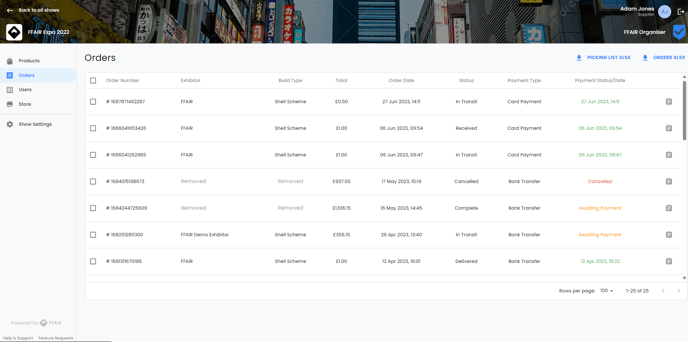
At a glance, you can see:
**Order Number**: This column displays a unique identifier assigned to each order placed by exhibitors. It helps in easily identifying and tracking individual orders.
**Exhibitor**: The Exhibitor column lists the name of the exhibitor who placed the order.
**Build Type**: This column specifies the type of stand/booth of the exhibitor.
**Total**: The Total column displays the total amount (net) of the order.
**Order Date**: This column shows the date and time the order was placed.
**Status**: The Status column reflects the current status of each order, such as processing, in transit, received and delivered. It offers real-time visibility into the progress of order fulfilment.
**Payment Type**: This column specifies the method of payment chosen by the exhibitor for completing the order transaction. It includes options for card payment or bank transfer.
**Payment Status/Date**: The Payment Status/Date column shows the payment status and date for each order, indicating if payment was successful and when it happened.
#### View individual order details
To view the details of an individual order:
- Navigate to the Orders screen
- Click on the clipboard beside the required order.
A pop-up screen will open on the right side of the screen, here you can view the:
**Exhibitor Details**
- Exhibitor name
- Company name
- Address
- Postcode
- Sales tax
- Contact Details
**Delivery Details**
- Delivery date (start/end date and time)
- Collection date (start/end date and time)
- Venue
- Address
- Venue Contact
- Show
- Stand
- Status
- Payment Type
- Payment Date
**Products (All values exclude sales tax)**
- Product image/name
- Category
- Price (excluding sales tax)
- Quantity
- Cost
- Notes (these will have been added by the exhibitor)
#### Export Order Details
From this same pop-up screen, you can choose to Export your order details:
**Download Supplier Invoice**
Click the icon to download a PDF version of your Supplier Invoice. This will include:
- Order payment status
- Invoice number
- Sold by (supplier)
- Billing address (exhibitor)
- Delivery details
- Order information (order date, order number, invoice number)
- Invoice details by product (product name, unit price(excl sales tax), fees per unit (excl sales tax), qty, sales tax & Total Price (inc sales tax)
- We will also provide a price breakdown, including fees & excluding fees.
**Print Order Details**
Click the icon to open the print preview for your order. This printout will include:
- Exhibitor Details
- Delivery Details
- Product details (excluding sales tax)
You can also click out of the pop-up to go back to the main order page, from here you can export by:
**Picking List XLSX**
Click the Picking List XLSX to download a full picking list for all your orders. This will provide you with columns:
- Show Name
- Product Name
- Product ID
- Quantity
Orders XLSX
Click the Orders XLSX to download a full product list for all your orders. This will provide you with a full rundown of orders including:
- Exhibitor Details
- Delivery Details
- Product details
- [Organiser](https://support.ffair.io/migration/organiser?hsLang=en#main-content)
- [Your FFAIR Account](https://support.ffair.io/migration/organiser?hsLang=en#your-ffair-account)
- [Getting Started](https://support.ffair.io/migration/organiser?hsLang=en#getting-started)
- [Setting Up A Show](https://support.ffair.io/migration/organiser?hsLang=en#setting-up-a-show)
- [Your Show Info](https://support.ffair.io/migration/organiser?hsLang=en#your-show-info)
- [Managing Exhibitor Tasks](https://support.ffair.io/migration/organiser?hsLang=en#managing-exhibitor-tasks)
- [Managing Exhibitors](https://support.ffair.io/migration/organiser?hsLang=en#managing-exhibitors)
- [Exhibitor Shop](https://support.ffair.io/migration/organiser?hsLang=en#exhibitor-shop)
- [Reporting & Data Collection](https://support.ffair.io/migration/organiser?hsLang=en#reporting-data-collection)
- [Integrations](https://support.ffair.io/migration/organiser?hsLang=en#integrations)
- [FAQ's](https://support.ffair.io/migration/organiser?hsLang=en#faqs)
- [Exhibitor](https://support.ffair.io/migration/exhibitor?hsLang=en#main-content)
- [Exhibitor Portal Overview](https://support.ffair.io/migration/exhibitor?hsLang=en#exhibitor-portal-overview)
- [Account Set Up](https://support.ffair.io/migration/exhibitor?hsLang=en#account-set-up)
- [Dashboard](https://support.ffair.io/migration/exhibitor?hsLang=en#dashboard)
- [Tasks](https://support.ffair.io/migration/exhibitor?hsLang=en#tasks)
- [Manual](https://support.ffair.io/migration/exhibitor?hsLang=en#manual)
- [Shop](https://support.ffair.io/migration/exhibitor?hsLang=en#shop)
- [FAQs](https://support.ffair.io/migration/exhibitor?hsLang=en#faqs)
- [Supplier](https://support.ffair.io/migration/supplier?hsLang=en#main-content)
- [Supplier Onboarding Guide](https://support.ffair.io/migration/supplier?hsLang=en#supplier-onboarding-guide)
- [Account Set Up](https://support.ffair.io/migration/supplier?hsLang=en#account-set-up)
- [Show Set Up](https://support.ffair.io/migration/supplier?hsLang=en#show-set-up)
- [Show/Shop Features](https://support.ffair.io/migration/supplier?hsLang=en#show-shop-features)
- [FAQ's](https://support.ffair.io/migration/supplier?hsLang=en#faqs)
- [Accounting](https://support.ffair.io/migration/supplier?hsLang=en#accounting)
[](https://www.ffair.io/)
[mailto:email@email.com](mailto:email@email.com)
Copyright © 2026, FFAIR Ltd