
The FFAIR to JET integration allows organisers to sync exhibitor data from FFAIR directly into Jonas Event Technology (JET), and gives exhibitors Single Sign-On (SSO) access into their JET tasks without needing a separate login. This removes the need to manually re-key exhibitor details into JET.

The FFAIR to JET integration automatically pushes exhibitor company and contact data from FFAIR to JET whenever an exhibitor record is added or updated, and generates a unique SSO Magic Link for each exhibitor so they can access their JET record straight from FFAIR.
Enabling the JET Integration
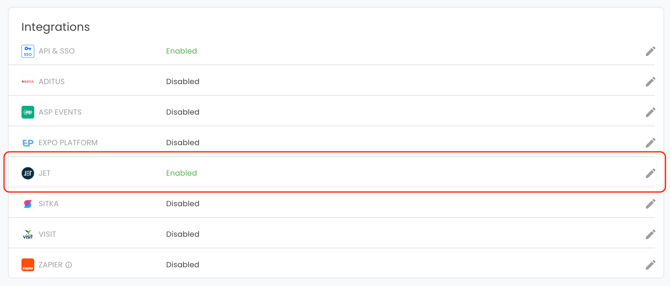
Access Show Settings:- Navigate to the desired show in FFAIR.
- Open the "Show Settings" page and go to the "Integrations" section.
Add JET Credentials:
- Locate the JET integration field.
- Click the 'Edit' icon to open the setup pop-up.
- Toggle FFAIR to JET on — this reveals the API Key and EventRef fields. Enter your API Key and EventRef.
- Your JET representative can provide these if you don't already have them. Hit 'Sync'.
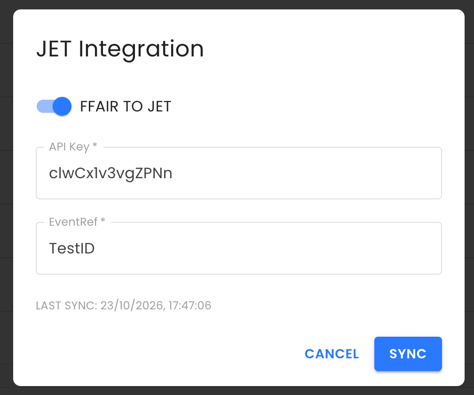
Once sync starts, all fields in the pop-up lock to prevent duplicate submissions, and a message shows the estimated completion time for the background sync.
If you close and reopen the pop-up while the sync is still running, the fields stay locked and the same progress message is shown.
Once the sync completes, the fields unlock and a Last Sync timestamp appears, showing the date and time data last synced successfully.
If a sync fails, an error message shows in the pop-up and the integration's status changes from Enabled to Sync Issue. Check your API Key and EventRef are correct, or contact your JET representative.
Setting Exhibitor Passes Allowances
You can set how many passes and guest invites each Exhibitor is allowed to issue on JET, directly from FFAIR.
Where to find it:
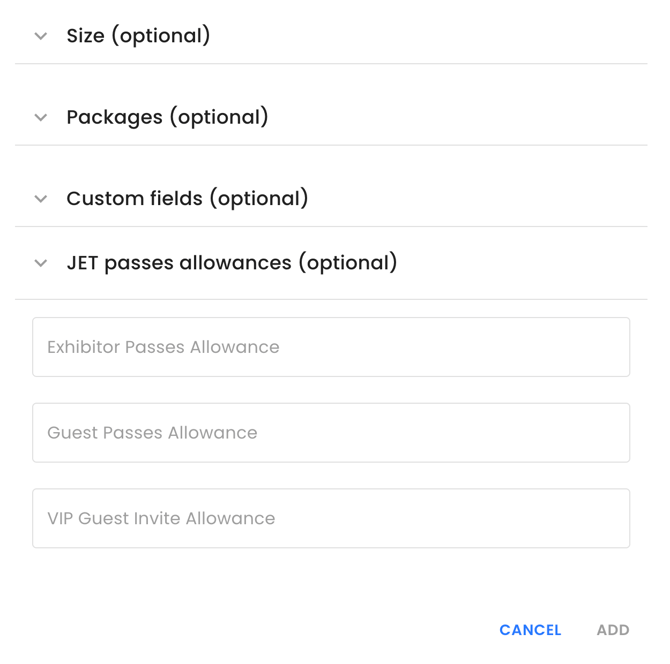
- Add Exhibitor modal — when adding a new Exhibitor, look for the JET passes allowances (optional) section, just below Custom fields (optional).
- Exhibitor Settings tab — open any Exhibitor on a Show and look for the JET Passes Allowances section, just below Custom Exhibitor Fields.
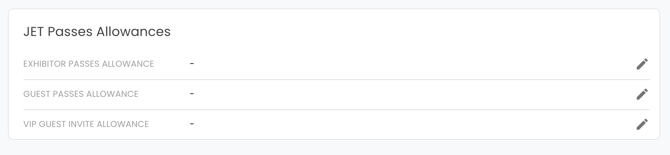
These sections only appear when JET is enabled for your Show.
The three fields you can set:
- Exhibitor Passes Allowance
- Guest Passes Allowance
- VIP Guest Invite Allowance
Good to know:
- Leave a field blank if there's no limit — JET will treat it as Unlimited.
- If you switch JET integration off and back on later, any values you've already entered will still be there.
What gets synced
- Only the exhibitor's Primary User details (name and email address) are sent to JET, along with each company's own Passes Allowance values, if you've set them. Other users on the stand — non-primary users and contractors — aren't synced individually, but they can still access the same JET record through their own SSO link.
- Only active exhibitors are synced — archived exhibitors are not sent to JET.
- Company and stand suffixes are not included in the sync.
- If two companies are assigned to the same shared stand, both get their own record in JET, each carrying the same Primary User details — but their own separate Passes Allowance values, if set.
- If a company or stand merge happens in FFAIR, JET treats this as a brand-new exhibitor record going forward. Any existing pre-merge records already in JET are left untouched.
Deleting or archiving an exhibitor in FFAIR does not delete the matching record in JET — records must be removed in JET directly if needed.
Adding the JET SSO Link
To embed the JET SSO Link into a task description:
- Navigate to the desired task in the Task Builder.
- Click the 'JET' icon on the toolbar to insert the Magic Link variable.
- Each exhibitor will see their own unique link wherever you've added this — clicking it takes them straight into their JET record, without needing to log in separately.
The JET icon is only available once the integration status shows as Enabled, and the link works for every exhibitor user type on the stand — primary, non-primary, and contractors.
JET Button in the Exhibitor Portal
Once the integration is enabled, exhibitors also see a JET button in their portal header. Clicking it opens their Magic Link in a new browser tab, taking them straight into JET. This button works for every user type associated with the stand.
Note: If an exhibitor's Magic Link hasn't been retrieved yet — for example, right after their record is first created — the JET button or task link won't be clickable until the next successful sync completes.