---
title: FFAIR -> Aditus SSO Integration
description: FFAIR - Aditus Integration
---
[Skip to content](https://support.ffair.io/organiser-knowledge-base/integrate-ffair-with-aditus#main-content)
[](https://www.ffair.io)
Open main navigation
Close main navigation
How can we help you?
- There are no suggestions because the search field is empty.
1. [FFAIR Organiser Knowledge Base](https://support.ffair.io/organiser-knowledge-base?hsLang=en)
2. [Integrations](https://support.ffair.io/organiser-knowledge-base/integrations?hsLang=en)
# FFAIR -\> Aditus SSO Integration
## The FFAIR → Aditus integration allows exhibitor and user data to sync one-way from FFAIR into Aditus (badging and ticketing).
####  
#### What happens once the integration is enabled
Once enabled:
- Exhibitor users are automatically synced to Aditus
- Exhibitors can access Aditus via **deep links** from their Exhibitor Portal
- Badge and stand personnel management happens directly in Aditus
This removes the need for manual imports or separate logins.
---
#### What this integration does
- One-way synchronisation: **FFAIR → Aditus**
- Syncs **Exhibitors and their users**
- Creates or updates users in Aditus whenever changes are made in FFAIR
- Generates **secure deep-link access** for each exhibitor user
---
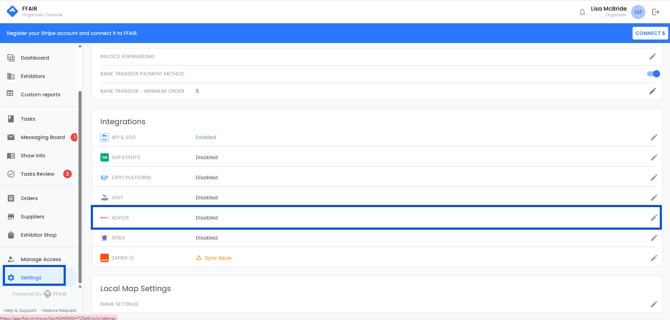
#### Where to find the integration
1. Go to **Show Settings**
2. Open **Integrations**
3. Select **Aditus**
****
---
#### Enabling the Aditus integration
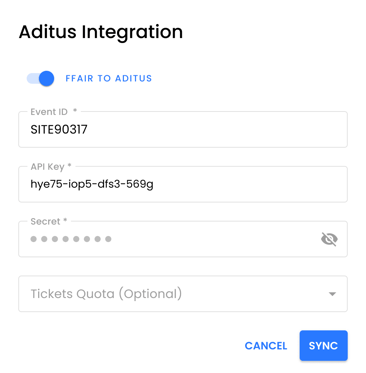
In the **Aditus modal**:
1. Enable the **FFAIR → Aditus** toggle
2. Complete the required fields:
- **Event ID**
- **Key**
- **Secret**
3. (Optional) Select a **Tickets Quota** custom field
- This allows you to assign a number of tickets to each exhibitor directly via FFAIR
4. Click **Sync**
Your **Aditus representative** can provide the required credentials.
#### 
---
#### Tickets Quota (optional)
If you use ticket quotas:
- Select a **Stand Custom Field** with type **Number**
- This value is sent to Aditus as the ticket quota per exhibitor
- Only this custom field is synced
(no other custom fields are included)
---
#### What data is synced
### Included
- All exhibitor users
- User contact details
- Stand details
- Ticket quotas (if configured)
### Excluded
- Contractors
- Archived users
- Archived exhibitors
- Custom fields (except Ticket Quotas)
If a user is archived in FFAIR, **no update is sent to Aditus**.
---
#### Exhibitor experience
Once the integration is enabled:
- A **Login to Aditus** button appears in the Exhibitor Portal
- Exhibitors click the button to access Aditus
- Login happens via a **secure deep link** (no password required)
---
#### Data mapping overview
| Aditus Field | FFAIR Field / Logic | Description |
| --- | --- | --- |
| FaireventId | Config setting | Event ID from Show Settings |
| UserImportMode | 2 | Hardcoded (DeepLinkImport) |
| Exhibitor\_ExternalId | company.id | Unique exhibitor ID |
| FaireventAppearance\_ExternalId | stand.standId | Unique stand ID |
| Exhibitor\_Name1 | company.name | Exhibiting company name |
| User\_FirstName | user.name (split) | First name |
| User\_LastName | user.name (split) | Last name |
| EMail | user.email | User email |
| Phone | stand.contactPhoneNumber | Optional |
| FaireventAppearance\_Booth | stand.name | Stand number/name |
| FaireventAppearance\_Area | stand.size.area | Converted to number |
| User\_DeeplinkToken | SHA256(user.email) | Deep-link token |
| TicketQuota | stand custom field | Mapped dynamically |
- [Become FFAIR Accredited](https://support.ffair.io/organiser-knowledge-base/become-ffair-accredited?hsLang=en)
- [Your FFAIR Account](https://support.ffair.io/organiser-knowledge-base/your-ffair-account?hsLang=en)
- [Show Set Up](https://support.ffair.io/organiser-knowledge-base/show-set-up?hsLang=en)
- [Your Show Info](https://support.ffair.io/organiser-knowledge-base/your-show-info?hsLang=en)
- [Managing Exhibitor Tasks](https://support.ffair.io/organiser-knowledge-base/managing-exhibitor-tasks?hsLang=en)
- [Managing Exhibitors](https://support.ffair.io/organiser-knowledge-base/managing-exhibitors?hsLang=en)
- [Exhibitor Shop](https://support.ffair.io/organiser-knowledge-base/exhibitor-shop?hsLang=en)
- [Reporting & Data Collection](https://support.ffair.io/organiser-knowledge-base/reporting-data-collection?hsLang=en)
- [Integrations](https://support.ffair.io/organiser-knowledge-base/integrations?hsLang=en)
- [FAQ's](https://support.ffair.io/organiser-knowledge-base/faqs?hsLang=en)
- [FFAIR Best Practices](https://support.ffair.io/organiser-knowledge-base/ffair-best-practices?hsLang=en)
[mailto:email@email.com](mailto:email@email.com)
Copyright © 2025, FFAIR Ltd