---
title: Add Exhibitors - Single Exhibitor
description: FFAIR Organiser Knowledge Base
---
[Skip to content](https://support.ffair.io/organiser-knowledge-base/migration/adding-exhibitors-single#main-content)
[](https://www.ffair.io)
Open main navigation
Close main navigation
How can we help you?
- There are no suggestions because the search field is empty.
1. [FFAIR Organiser Knowledge Base](https://support.ffair.io/organiser-knowledge-base?hsLang=en)
2. [Managing Exhibitors](https://support.ffair.io/organiser-knowledge-base/managing-exhibitors?hsLang=en)
# Add Exhibitors - Single Exhibitor
## How to add a single exhibitor.
**Before you start:**
- [Add Build/Persona Types](https://support.ffair.io/add-build-types?hsLang=en)
- [Add Custom Exhibitor Fields](https://support.ffair.io/add-custom-exhibitor-fields?hsLang=en)
- [Add Packages](https://support.ffair.io/add-packages?hsLang=en)
**1\. Navigate to the Exhibitors Page:**
- Log in to your portal.
- Select the relevant Show.
- In the left menu, find and click on "Exhibitors."
**2. Press the Blue Plus Button to Add a Single Exhibitor:**
- On the Exhibitors page, look for the Blue Plus button.
- Click on the Blue Plus Button to initiate the addition of a single exhibitor.
**3. Complete the Exhibitor Form:**
**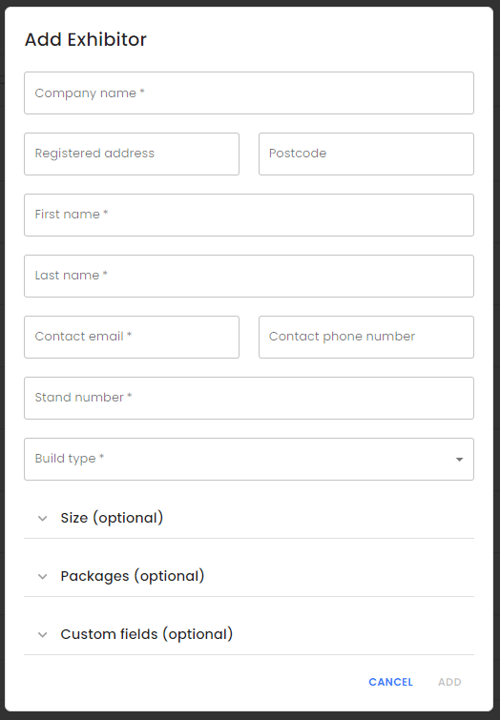**
- Complete the necessary information; fields marked with an '\*' are mandatory.
- Size, Package, and Custom Exhibitor Fields are optional.
- To provide details for Size, Package, and Custom Exhibitor Fields, expand the respective sections.
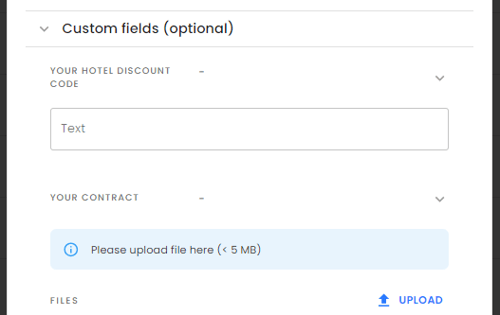
- Fill in the necessary information.
**4. Press 'Add':**
- Once all required information is entered, the 'Add' button will become active. Press to finalise the addition of the exhibitor.
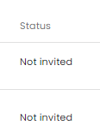
**Note:** Exhibitors will not be invited automatically, they will be loaded in a 'Not Invited' state; refer to the '[How To Invite Exhibitors](https://support.ffair.io/invite-exhibitors?hsLang=en)' article to invite them.
- [Become FFAIR Accredited](https://support.ffair.io/organiser-knowledge-base/become-ffair-accredited?hsLang=en)
- [Your FFAIR Account](https://support.ffair.io/organiser-knowledge-base/your-ffair-account?hsLang=en)
- [Show Set Up](https://support.ffair.io/organiser-knowledge-base/show-set-up?hsLang=en)
- [Your Show Info](https://support.ffair.io/organiser-knowledge-base/your-show-info?hsLang=en)
- [Managing Exhibitor Tasks](https://support.ffair.io/organiser-knowledge-base/managing-exhibitor-tasks?hsLang=en)
- [Managing Exhibitors](https://support.ffair.io/organiser-knowledge-base/managing-exhibitors?hsLang=en)
- [Exhibitor Shop](https://support.ffair.io/organiser-knowledge-base/exhibitor-shop?hsLang=en)
- [Reporting & Data Collection](https://support.ffair.io/organiser-knowledge-base/reporting-data-collection?hsLang=en)
- [Integrations](https://support.ffair.io/organiser-knowledge-base/integrations?hsLang=en)
- [FAQ's](https://support.ffair.io/organiser-knowledge-base/faqs?hsLang=en)
- [FFAIR Best Practices](https://support.ffair.io/organiser-knowledge-base/ffair-best-practices?hsLang=en)
[mailto:email@email.com](mailto:email@email.com)
Copyright © 2025, FFAIR Ltd