---
title: FFAIR -> ExpoPlatform Integration
description: FFAIR Organiser Knowledge Base
---
[Skip to content](https://support.ffair.io/organiser-knowledge-base/migration/ffair-expoplatform-integration#main-content)
[](https://www.ffair.io)
Open main navigation
Close main navigation
How can we help you?
- There are no suggestions because the search field is empty.
1. [FFAIR Organiser Knowledge Base](https://support.ffair.io/organiser-knowledge-base?hsLang=en)
2. [Integrations](https://support.ffair.io/organiser-knowledge-base/integrations?hsLang=en)
# FFAIR -\> ExpoPlatform Integration
## How to set up and enable the FFAIR - ExpoPlatform SSO
### **ExpoPlatform Integration field map**
### **User documentation:**
1. The package is sent as a custom field to the Expo platform, you will need to make it available on the Expo platform by adding a custom field with name "package".

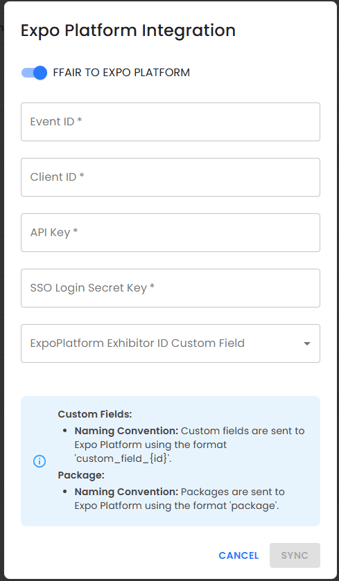
1. Custom fields are sent with the name custom\_field\_{id} as Expo Platform custom fields. You will need to make all fields available on the Expo Platform, by creating it as package. You must use the custom field ID value from modal below. For example custom\_field\_SlsHiuiaWrTJ5ww45ynN

### **Enabling the Expo Platform integration**
1. Ensure you have set up your FFAIR and ExpoPlatform fields to match as directed above.
2. Navigate to the **Settings** page on your show in FFAIR and scroll down to the '**Integrations**' section.
3. Locate the Expo Platform integration.
4. Click the pencil to the right.
5. On the pop up page that appears, toggle the **FFAIR to Expo Platform** toggle on.
6. This will provide you with 4 empty fields, you need to ask Expo Platform for the information to input here.
7. Once received and inputted hit Sync. This will enable the integration.
### **SSO link in the Task description**
When the **Expo Platform** integration is *enabled* for the **Show**, Organisers can add an **SSO link** to the **Task description** by clicking on the specially designed button. When an **Exhibitor** clicks on the link, it functions exactly like the **Expo Platform link** in the header, automatically logging them into the **Expo Platform**.

- [Become FFAIR Accredited](https://support.ffair.io/organiser-knowledge-base/become-ffair-accredited?hsLang=en)
- [Your FFAIR Account](https://support.ffair.io/organiser-knowledge-base/your-ffair-account?hsLang=en)
- [Show Set Up](https://support.ffair.io/organiser-knowledge-base/show-set-up?hsLang=en)
- [Your Show Info](https://support.ffair.io/organiser-knowledge-base/your-show-info?hsLang=en)
- [Managing Exhibitor Tasks](https://support.ffair.io/organiser-knowledge-base/managing-exhibitor-tasks?hsLang=en)
- [Managing Exhibitors](https://support.ffair.io/organiser-knowledge-base/managing-exhibitors?hsLang=en)
- [Exhibitor Shop](https://support.ffair.io/organiser-knowledge-base/exhibitor-shop?hsLang=en)
- [Reporting & Data Collection](https://support.ffair.io/organiser-knowledge-base/reporting-data-collection?hsLang=en)
- [Integrations](https://support.ffair.io/organiser-knowledge-base/integrations?hsLang=en)
- [FAQ's](https://support.ffair.io/organiser-knowledge-base/faqs?hsLang=en)
- [FFAIR Best Practices](https://support.ffair.io/organiser-knowledge-base/ffair-best-practices?hsLang=en)
[mailto:email@email.com](mailto:email@email.com)
Copyright © 2025, FFAIR Ltd