---
title: Json Feed
description: JSON feed
---
[Skip to content](https://support.ffair.io/organiser-knowledge-base/migration/json-feed#main-content)
[](https://www.ffair.io)
Open main navigation
Close main navigation
How can we help you?
- There are no suggestions because the search field is empty.
1. [FFAIR Organiser Knowledge Base](https://support.ffair.io/organiser-knowledge-base?hsLang=en)
2. [Integrations](https://support.ffair.io/organiser-knowledge-base/integrations?hsLang=en)
# Json Feed
## How to enable and use the JSON feed for task responses.
**What is the JSON feed used for?**
The JSON feed in FFAIR is designed to send your exhibitors' task responses directly to a third-party platform or application.
For example, if you have a website listing task that collects an exhibitor’s company name, stand number, company description, and logo, the JSON feed can transmit this data to automatically generate a listing on a third-party website. This streamlines the process, saving time and ensuring data accuracy across platforms.
---
**Enabling JSON Feed:**
- On the Tasks page, click on the  icon beside the date column to switch on the JSON feed for a task.
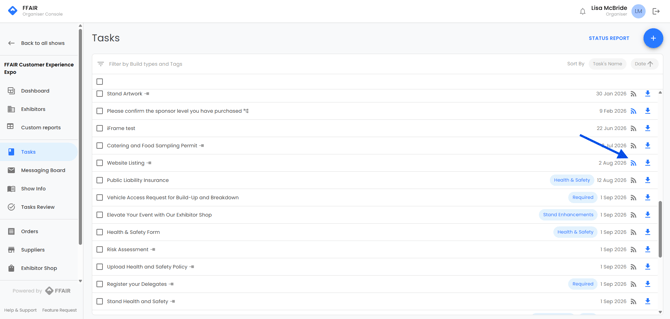
- In the pop-up window, toggle the setting from "Feed Disabled" to "Feed Enabled."
- If desired, check the "Only include completed tasks in feed" box. This ensures that tasks awaiting approval won't be sent until they are marked as "Done."
- Click the icon to view your URL, then use the copy button to copy it. Share this URL with the third-party platform.
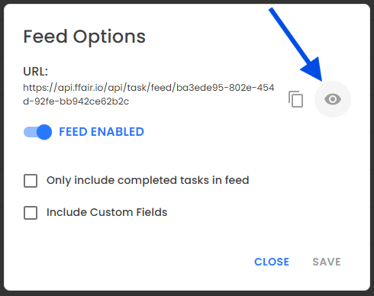
- Click "Save."
Once the third-party platform adds your URL, they will begin receiving a live feed of responses for the selected task.
When an exhibitor submits a response, please allow up to 5 minutes for this to appear on the website/app.
- [Become FFAIR Accredited](https://support.ffair.io/organiser-knowledge-base/become-ffair-accredited?hsLang=en)
- [Your FFAIR Account](https://support.ffair.io/organiser-knowledge-base/your-ffair-account?hsLang=en)
- [Show Set Up](https://support.ffair.io/organiser-knowledge-base/show-set-up?hsLang=en)
- [Your Show Info](https://support.ffair.io/organiser-knowledge-base/your-show-info?hsLang=en)
- [Managing Exhibitor Tasks](https://support.ffair.io/organiser-knowledge-base/managing-exhibitor-tasks?hsLang=en)
- [Managing Exhibitors](https://support.ffair.io/organiser-knowledge-base/managing-exhibitors?hsLang=en)
- [Exhibitor Shop](https://support.ffair.io/organiser-knowledge-base/exhibitor-shop?hsLang=en)
- [Reporting & Data Collection](https://support.ffair.io/organiser-knowledge-base/reporting-data-collection?hsLang=en)
- [Integrations](https://support.ffair.io/organiser-knowledge-base/integrations?hsLang=en)
- [FAQ's](https://support.ffair.io/organiser-knowledge-base/faqs?hsLang=en)
- [FFAIR Best Practices](https://support.ffair.io/organiser-knowledge-base/ffair-best-practices?hsLang=en)
[mailto:email@email.com](mailto:email@email.com)
Copyright © 2025, FFAIR Ltd