---
title: How to view and manage your existing suppliers.
description: FFAIR Organiser Knowledge Base
---
[Skip to content](https://support.ffair.io/organiser-knowledge-base/migration/suppliers#main-content)
[](https://www.ffair.io)
Open main navigation
Close main navigation
How can we help you?
- There are no suggestions because the search field is empty.
1. [FFAIR Organiser Knowledge Base](https://support.ffair.io/organiser-knowledge-base?hsLang=en)
2. [Exhibitor Shop](https://support.ffair.io/organiser-knowledge-base/exhibitor-shop?hsLang=en)
# How to view and manage your existing suppliers.
**1**. To access and review existing suppliers associated with your account, follow these steps:
- Start by navigating to your account homepage.
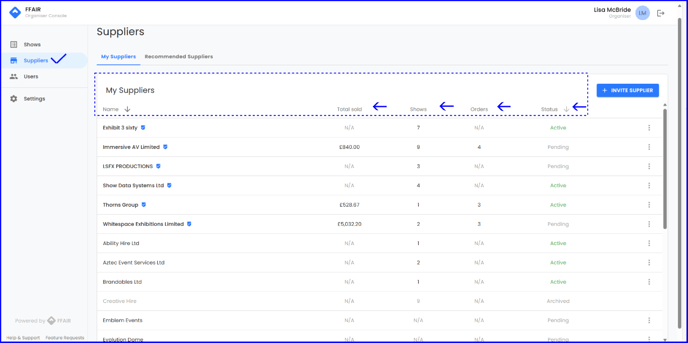
- Click on the "Suppliers" tab located in the navigation menu.
- Here, you'll find an overview of existing suppliers listed on the "My Suppliers" tab.
- Each supplier entry includes essential details such as the name of the supplier, total value across all shows, number of shows they've participated in, number of orders received, and their current status (active or pending, depending on whether they've accepted the invitation to join FFAIR).
---
**2. Managing Supplier Options:**
On any supplier line, you'll notice three dots that provide access to various options:
- **View Profile:** Clicking this option allows you to view the detailed profile of the selected supplier, including contact information.
- **Edit:** Use this option to make necessary edits or updates to the supplier's information, such as contact details.
- **Copy Invite Link:** This feature generates a unique invitation link that you can share with suppliers to invite them to join FFAIR.
- **Archive:** Archiving a supplier removes them from active view while retaining their information for reference purposes.
- [Become FFAIR Accredited](https://support.ffair.io/organiser-knowledge-base/become-ffair-accredited?hsLang=en)
- [Your FFAIR Account](https://support.ffair.io/organiser-knowledge-base/your-ffair-account?hsLang=en)
- [Show Set Up](https://support.ffair.io/organiser-knowledge-base/show-set-up?hsLang=en)
- [Your Show Info](https://support.ffair.io/organiser-knowledge-base/your-show-info?hsLang=en)
- [Managing Exhibitor Tasks](https://support.ffair.io/organiser-knowledge-base/managing-exhibitor-tasks?hsLang=en)
- [Managing Exhibitors](https://support.ffair.io/organiser-knowledge-base/managing-exhibitors?hsLang=en)
- [Exhibitor Shop](https://support.ffair.io/organiser-knowledge-base/exhibitor-shop?hsLang=en)
- [Reporting & Data Collection](https://support.ffair.io/organiser-knowledge-base/reporting-data-collection?hsLang=en)
- [Integrations](https://support.ffair.io/organiser-knowledge-base/integrations?hsLang=en)
- [FAQ's](https://support.ffair.io/organiser-knowledge-base/faqs?hsLang=en)
- [FFAIR Best Practices](https://support.ffair.io/organiser-knowledge-base/ffair-best-practices?hsLang=en)
[mailto:email@email.com](mailto:email@email.com)
Copyright © 2025, FFAIR Ltd