---
title: Show Suppliers
description: FFAIR Organiser Knowledge Base
---
[Skip to content](https://support.ffair.io/organiser-knowledge-base/migration/suppliers-1#main-content)
[](https://www.ffair.io)
Open main navigation
Close main navigation
How can we help you?
- There are no suggestions because the search field is empty.
1. [FFAIR Organiser Knowledge Base](https://support.ffair.io/organiser-knowledge-base?hsLang=en)
2. [Exhibitor Shop](https://support.ffair.io/organiser-knowledge-base/exhibitor-shop?hsLang=en)
# Show Suppliers
## View Show Supplier information and Add New Show Supplier.
**View Show Supplier Information**
To access and review supplier information for your show, follow these steps:
1. **Navigate to the Suppliers Page:**
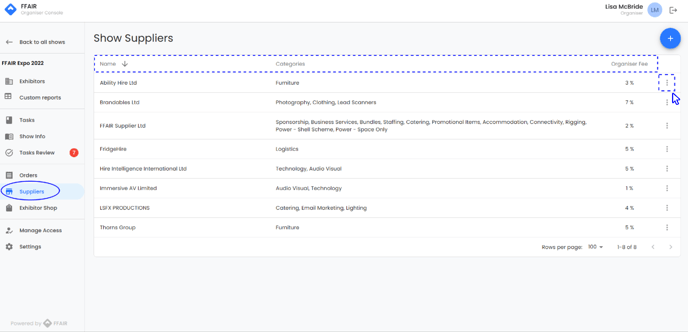
- Access the suppliers page from the left-hand menu. Here, you'll find an overview of all suppliers added to this show.
2. **Review Supplier Details:**
- On the suppliers page, you can view the following information:
- **Supplier Name:** Name of the supplier.
- **Categories:** Categories of goods offered by the supplier.
- **Organiser Fee:** Agreed percentage fee earned by the organiser from products sold via the supplier. (fee added to supplier product cost)
- Click the three dots beside any supplier to edit their information as needed.
---
**Add Supplier to Show**
To add a supplier to your show, follow these steps:
1. **Click the Blue + Button:**
- Located at the top right corner of the page, click the blue + button to initiate the process of adding a new supplier to your show.
2. **Select Supplier and Categories:**
- From the supplier dropdown menu, choose one of your existing suppliers to add to the show.
- From the categories dropdown menu, select all categories of goods this supplier will be selling at this show.
3. **Specify Organiser Fee:**
- In the organiser fee field, enter the agreed percentage fee you will earn from any product sold via the supplier.
4. **Toggle Notify Button:**
- Decide whether to notify the supplier that they have been added to your show by toggling the notify button on or off. (Blue indicates notification is on, while grey indicates it's off).
5. **Click Save:**
- Once all details are entered and confirmed, click save to add the supplier to your show.
Select categories accurately to ensure your suppliers' products appear for your exhibitors.
- [Become FFAIR Accredited](https://support.ffair.io/organiser-knowledge-base/become-ffair-accredited?hsLang=en)
- [Your FFAIR Account](https://support.ffair.io/organiser-knowledge-base/your-ffair-account?hsLang=en)
- [Show Set Up](https://support.ffair.io/organiser-knowledge-base/show-set-up?hsLang=en)
- [Your Show Info](https://support.ffair.io/organiser-knowledge-base/your-show-info?hsLang=en)
- [Managing Exhibitor Tasks](https://support.ffair.io/organiser-knowledge-base/managing-exhibitor-tasks?hsLang=en)
- [Managing Exhibitors](https://support.ffair.io/organiser-knowledge-base/managing-exhibitors?hsLang=en)
- [Exhibitor Shop](https://support.ffair.io/organiser-knowledge-base/exhibitor-shop?hsLang=en)
- [Reporting & Data Collection](https://support.ffair.io/organiser-knowledge-base/reporting-data-collection?hsLang=en)
- [Integrations](https://support.ffair.io/organiser-knowledge-base/integrations?hsLang=en)
- [FAQ's](https://support.ffair.io/organiser-knowledge-base/faqs?hsLang=en)
- [FFAIR Best Practices](https://support.ffair.io/organiser-knowledge-base/ffair-best-practices?hsLang=en)
[mailto:email@email.com](mailto:email@email.com)
Copyright © 2025, FFAIR Ltd