---
title: Managing Product Surcharges & Unpublishing Products
description: Managing Product Surcharges & Unpublishing Products
---
[Skip to content](https://support.ffair.io/supplier-knowledge-base/migration/creating-product-surcharges#main-content)
[](https://www.ffair.io)
Open main navigation
Close main navigation
How can we help you?
- There are no suggestions because the search field is empty.
1. [FFAIR Supplier Knowledge Base](https://support.ffair.io/supplier-knowledge-base?hsLang=en-gb)
2. [Managing your Products](https://support.ffair.io/supplier-knowledge-base/managing-your-products?hsLang=en-gb)
# Managing Product Surcharges & Unpublishing Products
## A surcharge allows suppliers to increase product prices at specific times before an event. This can be useful for early pricing discounts or late-order fees. Surcharges can be set as percentage-based or a fixed fee.
#### **How to Add a Surcharge to a Product**
#### **Step 1: Access the Surcharge Tool**
1. **Log in** to your **Supplier Portal**.
2. Navigate to the Global **Products** page.
3. Check the checkbox next to the product(s) you want to apply a surcharge to.
4. A **three-dot menu** will appear in the top-right corner.
5. Click the **three-dot menu**, then select **"Surcharge"**.
#### **Step 2: Create a Surcharge**
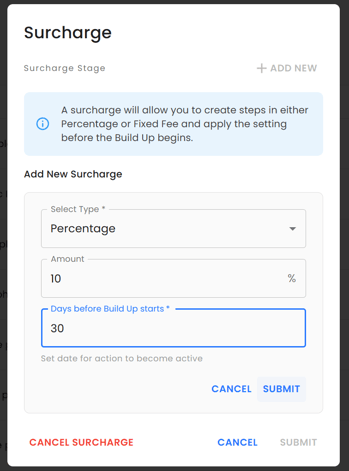
1. Click **"Add New"**.
2. Choose a **Surcharge Type**:
- **Percentage**: Increases the price by a set percentage.
- **Fixed Fee**: Adds a fixed amount to the price.
- **Unpublish Product**: Removes the product from the Exhibitor Shop on a set date.
3. Enter the Surcharge Amount:
- If **Percentage**, enter the percentage increase (e.g., 10% means the price will increase by 10%).
- If **Fixed Fee**, enter the amount to add (e.g., £50 will add £50 to the base price).
4. Choose when the surcharge will be applied:
- Enter **X days before Build Up starts** for the surcharge to activate.
- The **Build Up date is set by the event organiser** and can be viewed in **Show Settings**.
5. Click **Submit** to save the surcharge.
#### **Step 3: Add Additional Surcharge Stages (Optional)**
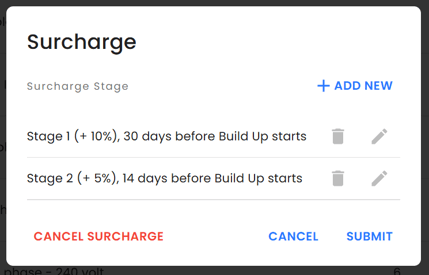
- To set multiple surcharge increases (e.g., a price increase 30 days before build-up, then another 14 days before), repeat the steps above and add as many surcharge stages as needed.
---
### **Unpublishing a Product on a Certain Date**
Suppliers can use this function to **automatically remove a product** from the Exhibitor Shop before an event, preventing last-minute orders.
#### **How to Unpublish a Product on a Specific Date**
1. Follow **Step 1** to open the **Surcharge** tool.
2. Click **"Add New"**.
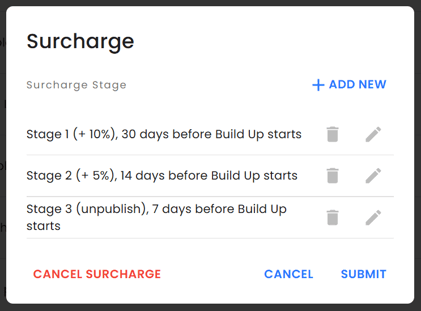
3. Select **"Unpublish Product"** in the **Surcharge Type** dropdown.
4. Choose **X days before Build Up starts** for when the product should be removed from the shop.
5. Click **Submit**.
💡 **Example Use Case:** If you stop accepting orders **7 days before Build Up starts**, you can set the product to be unpublished **7 days before the Build Up date**.
---
- **Surcharges apply to the base product price** (including any overrides).
- **Surcharges are overwritten** if a new surcharge is applied to the same product.
- **You can view the Build Up date in the Show Settings page.**
- **Exhibitors cannot see or purchase unpublished products.**
- [Supplier Onboarding Guide](https://support.ffair.io/supplier-knowledge-base/supplier-onboarding-guide?hsLang=en-gb)
- [Account Set Up](https://support.ffair.io/supplier-knowledge-base/account-set-up?hsLang=en-gb)
- [Managing your Products](https://support.ffair.io/supplier-knowledge-base/managing-your-products?hsLang=en-gb)
- [Managing your Shop](https://support.ffair.io/supplier-knowledge-base/managing-your-shop?hsLang=en-gb)
- [Managing Shop Orders](https://support.ffair.io/supplier-knowledge-base/managing-shop-orders?hsLang=en-gb)
- [Accounting](https://support.ffair.io/supplier-knowledge-base/accounting?hsLang=en-gb)
- [Integrations](https://support.ffair.io/supplier-knowledge-base/integrations?hsLang=en-gb)
- [FAQs](https://support.ffair.io/supplier-knowledge-base/faqs?hsLang=en-gb)
[mailto:email@email.com](mailto:email@email.com)
Copyright © 2025, FFAIR Ltd