
Exhibitors can:
-
See Tags directly on Products
-
Filter Products by Tags in the Exhibitor Shop
Used well, Tags can increase visibility, clicks, and conversions.
Why Product Tags matter
Product Tags are shown to exhibitors in the Exhibitor Shop.
They act as visual signals that help exhibitors decide faster.
Well-chosen Tags can:
-
Draw attention to key Products
-
Create urgency or social proof
-
Help exhibitors filter and compare options quickly
Examples of high-impact Tags
-
Popular Choice
-
New
-
Selling Fast
-
Best Seller
-
Limited Availability
These encourage fear of missing out (FOMO) and help exhibitors make quicker purchasing decisions.
How exhibitors see and use Tags
In the Exhibitor Shop:
-
Tags appear as chips on Products
-
Exhibitors can filter Products by Tag
-
Multiple Tags help Products appear in more filtered views
If a Product isn’t tagged, it’s easier for exhibitors to miss it.
Adding Tags to a Product
-
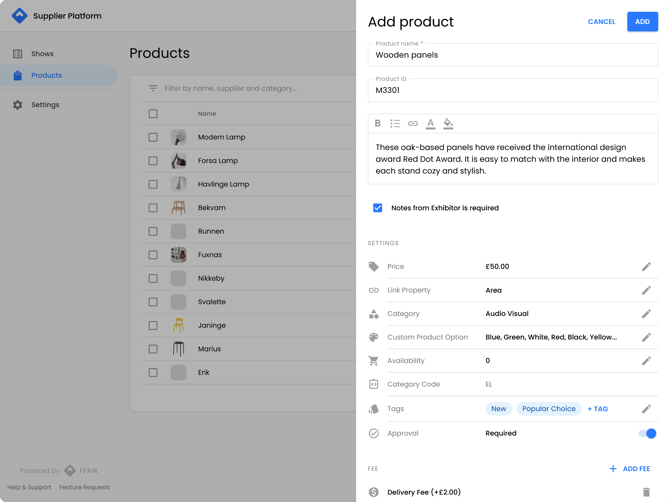
Navigate to the Products page.
-
Open the Product drawer.
-
Find the Tags section.
-
Click + Tag.
-
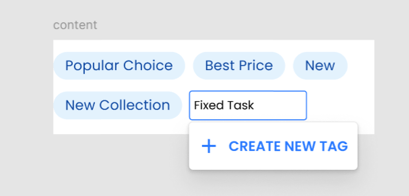
Start typing to select an existing Tag or create a new one.
Autocomplete behaviour
-
Existing Tags appear as suggestions.
-
Create new tag appears if no match exists.
-
You can select any option from the dropdown.
Tag rules
-
Tags are not case-sensitive (saved capitalised).
-
Minimum length: 3 characters
-
Maximum length: 22 characters
Editing Tags on a Product
-
Click Edit Tags next to the Tags section.
-
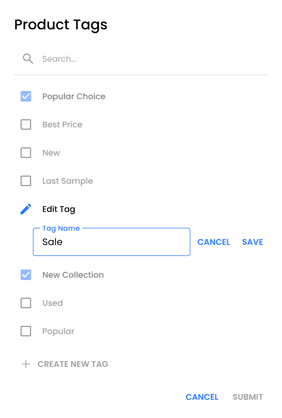
The Edit Tags pop-up shows all available Tags.
You can:
-
Select multiple Tags
-
Search Tags (not case-sensitive)
-
Add a new Tag
-
Remove Tags from the Product
-
Edit existing Tag names
Changes apply immediately.
Managing Tags effectively
Inside the Edit Tags pop-up you can:
-
Add new Tags
-
Rename existing Tags
-
Remove Tags from Products
Keeping Tags consistent helps exhibitors trust and use filters more confidently.
Best practice: use Tags to drive sales
To get the most value from Tags:
-
Use intent-based Tags
-
Focus on what influences exhibitor decisions
-
Avoid cluttering Products with too many Tags